
FAQ
Registering with Peto
How do I register?
Click on the “Register Now” link on the Peto homepage, or the Buyer or Supplier screens. Complete the registration form and then click on the appropriate button. Your account will be validated and activated within 24 hours.
Can I register as a buyer?
Peto is designed for UK public sector, in particular the NHS and Local Government. You can register as a Buyer if you work in the public sector and have a valid government email address.
Can I register as a seller?
If you are, or intend to be, a supplier of products or services to the UK public sector, then you can register as a Peto Supplier.
How much does Peto Marketplace cost?
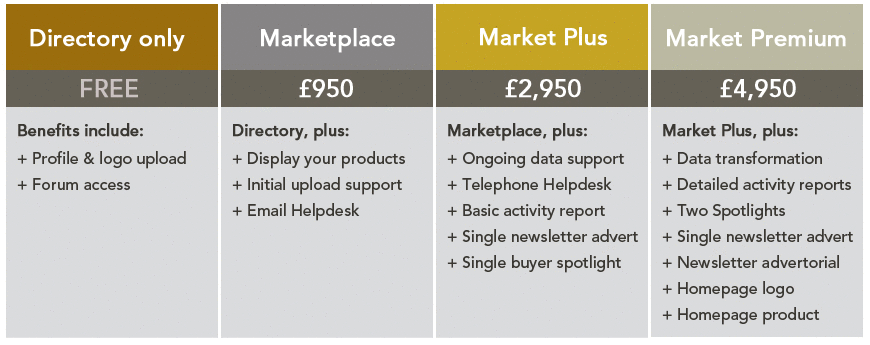
Peto marketplace is free for all Buyers. For Suppliers, we have a number of membership levels , including a free directory only option.
Can I upgrade my membership?
If you'd like to upgrade your membership and access the enhanced features of Peto Marketplace, please contact a member of our and they’ll be happy to help.
Do you have a privacy policy?
Peto respects your privacy, and we take security concerns very seriously. For full details, please review our our Privacy Policy .
What is my information used for?
The information you provide is used to enable access to Peto’s services which are appropriate to your status as a Buyer or a Supplier. Consult our Privacy Policy for more information.
Can I advertise with Peto?
Peto offers a range of advertising options for Marketplace members. To enquire, please contact our .
Contact Peto
How do I contact Peto?
At Peto we welcome your feedback and comments. Please click here to contact Peto .
Account Details
How do I update my details?
On the top left of every page on Peto Marketplace is a link to “
My Account
”. Visit this dashboard, and then navigate to the “My Details” link in the sidebar.
On this page you can edit a range of account information, including your personal details, your job details, and your areas of interest.
At the bottom of this page, you can also opt into the Supplier Directory or the Buyer Directory, depending on your account type.
Please note that each section has a separate update button. Pressing update in one section will lose any unsaved updates in the other sections.
How do I change my password?
Click on the “ My Account ” link, and then select “Change Password” from the sidebar. Enter a new password twice to confirm it, and then click the “Update” button.
I've forgotten my password - what do I do now?
Use our forgotten password service. Click on the “ Sign In ” link and then under the standard fields for username and login, there is a “Forgotten Password?” heading. Enter your email address, then click the “Request New Password” button. You will receive an email containing a link to help you login, together with instructions on how to choose a new password.
I've forgotten my username - what do I do now?
Your username is your work email address. If you cannot login using these credentials, please contact us with your full name and the name of your organisation. We will check our records and provide your login details via email.
Buyer and Supplier Directories
What is the Buyer Directory?
The Buyer Directory contains basic details about Buyers and their organisation, and will only be viewable by other registered Buyers. This feature is in development.
What is the Supplier Directory?
All registered Suppliers can upload detailed information about their organisation to the Supplier Directory . This information is visible to all registered Buyers and Suppliers, and is a valuable opportunity for companies to market themselves and elaborate on the services they provide.
Does Peto vet Suppliers?
Currently, Peto does not have a vetting policy for Suppliers. It is our belief that a free and open market, together with a comprehensive system of peer review and ratings, is the most efficient way of distinguishing one Supplier from another.
Peto Marketplace
How do I use the search facility?
There are two search fields along the top of the page, to help you quickly find the product you are looking for. The first field is to conduct a search based on eClass, e.g. A, AA, AAA, etc. The second field is to conduct a search based on keywords. Simply enter your terms and click on “GO” or “Search” to commence your search.
What is eClass?
eClass is a bespoke classification system for products and services, owned and designed by the English NHS. The purpose of NHS-eClass is to facilitate the accurate analysis of expenditure. NHS-eClass was operated for the NHS Purchasing and Supply Agency, but is now administered by NHS Shared Business Services.
Why does Peto Marketplace use eClass?
eClass is the standard classification system for NHS procurement, and it is widely used by both Buyers and Suppliers. By adopting it as a catergorisation model for the products and services available on Peto Marketplace, Buyers will quickly and easily be able to find what they’re looking for. Peto also works with other classification systems such as pro-class and UNSPSC.
How does a supplier decide which eClass applies to their product/service?
Suppliers should use the official NHS-eClass website , which is the authoritative resource for the correct application of eClasses to products and services. This information is also contained in our Peto Supplier Adoption Pack .
How do I narrow a search?
In the second search field, you can further narrow the scope of your keyword search by selecting one of four options from the drop down menu immediately adjacent to it. You can choose to confine the search to "Product", "Manufacturer", "Supplier", "Peto ID" or "Barcode".
How do I filter a search using attributes?
Attributes are the additional descriptors for a product or service, shown on the left-hand side. Buyers can select the desired attribute value to filter the list.
What is a Peto ID?
A Peto ID is the unique, separate identification code that Peto Marketplace has allocated to a product or service. When making a repeat purchase of an item, you can use either the eClass or the Peto ID to quickly locate your item. Suppliers can also use the Peto ID when deleting a single product or service from Peto Marketplace.
What does a similar product mean?
A similar product is the same product offered for sale by another Supplier. We use a fuzzy logic algorithm to compare products as they are uploaded and assign a percentage confidence match. This % shows our level of confidence that the products match based on their barcode, brand, variant and manufacturer details. Various weighting and sensitivity factors are used to generate the score and the Similar threshold is set at 80% of the possible total score.
What does a substitute product mean?
A "substitute" for a given product will have the same function but may differ in manufacturer, colour and capability. A substitute score is calculated by looking at products with same function and calculating how many of their attributes are the same. So for example, if you are looking at a product with 5 attributes (e.g. size, weight, colour, flavour and packaging), a 80% substitute product would perform the same function, have the same weight, colour, flavour and packaging but would be a different size.
Can I print pages from Peto Marketplace?
Yes. For best results we recommend printing from Firefox or Internet Explorer (8 or above) with the Print Background Images and Print Background Colours options selected.
Reviews
How does the reviews section work?
Our product reviews are submitted by registered buyers and might help to guide your purchase decision. Star-ratings (out of five) will appear on every review, along with commentary on the performance of the product or supplier.
Who writes the reviews?
All of our reviews are submitted by our registered buyers. Suppliers are not allowed to review any products, whether they are part of their own inventory or whether they belong to another seller’s products. Peto is completely independent of the review process, and does not contribute any product reviews.
How do I write a review?
If you're a registered Buyer and you’d like to add your opinion to the product page, simply click on the “Submit Product Review” button. This will open a pop-up window with a set of fields for you to fill in. Enter a review title, your product review, rate the product out of five stars. When you’re satisfied with your work, click the submit product review button. If you want to remain anonymous then delete your name from the name field, in which case the term “submitted by anonymous” will be displayed against the review.
Guidance for Buyers
What is a price alert?
Once a desired product has been identified on Peto Marketplace, you can keep track of the product’s cost using a price alert. You will be automatically notified by email if the product price falls.
How do I set up a price alert?
The option to create a price alert is on the detailed product view screen. There is a dialogue that states “notify me when the price is less than”, followed by a slider where you can specify the lower price. You can also manually enter the figure into a field next to the slider. Please note, you cannot specify a price alert higher than the price given in the product listing.
When you’re ready to create your price alert, click on “Create Price Alert”. A pop-up window will confirm that the price alert has been created, with details of the product and your preferred price. You now have the option to either continue shopping, or to visit your “Price Alerts” page in the account dashboard and manage the other price alerts you have created.
I have a question about a product, can I contact the seller?
Yes. On the product page in question, there is a “Supplier Info” box in the sidebar. This box will contain both a “View Profile” link and a “Contact” link. The “View Profile” link takes you to a contact form on their profile page. The “Contact” link will open a blank email direct to the Supplier. Once sent, the Supplier will be notified about your enquiry.
How do I order a product/service?
First, you’ll need to specify the quantity of products required. Once you’ve done so, click on the “Calculate” button to work out the price. When ready, click on the “Add” button to add it to your shopping basket. A pop-up window will confirm that it has been added to your basket. You now have the option to either continue shopping, or to visit the “My Basket” page and take an action such as sending a product query, requesting a quote or securing a price.
How do I pay for the product/service?
Due to the complexity of existing payment processes and systems, Peto does not handle payment transactions between Buyers and Suppliers. Once you have made a final decision about what to purchase, and at what price and quantity, you can secure the price on the system for 28 days by selecting “Secure These Prices”. This will generate a unique reference code for both you and the Supplier, which can be used to guarantee the prices obtained as you follow your organisation’s standard “Procure to Pay” processes.
Will VAT and delivery be included in the price of a product/service?
Pricing information is shown in the Pricing Options attribute assigned to all products. The term “Including VAT and Delivery” means the price includes taxes and delivery. The term “Excluding VAT and Delivery” means the price excludes taxes and delivery.
What does a secured price mean?
Prices will rise and fall on Peto Marketplace, which is where the option to secure a price is invaluable to Buyers. If a Buyer sees a product or service being sold at an attractive price-point, they can effectively freeze that price, and the Supplier agrees to honour that price for 28 days from the point when it was first secured.
How do I initiate a secured price?
Once you have added your products to the basket, navigate to the “My Basket” page and, in the lower left side of the screen, you will see an action form. Choose an action type, enter a name for the action for your own reference and enter a reference code for the supplier if required. Next, specify your contact preferences and then click on the "Submit" button below. Once the prices have been secured, a unique reference number is generated and shared between Buyer and Supplier.
What happens after I secure a price?
Each Supplier will then be notified about the specific prices and the quantities you are interested in purchasing. You can then follow your organisation’s standard proceedure to pay processes, or begin a dialogue directly with the Supplier. Alternatively, they will contact you about finalising the sale.
What do I do if a Supplier does not honour a secured price?
Suppliers are bound by the Peto Terms of Website Use (including Supplier terms ). Failure to honour a secured price will incur an appropriate penalty, as laid down in these terms. If this has happened to you, please notify us in the first instance and we will investigate the matter.
What is a saved basket?
When shopping for products, you may find yourself shopping for large numbers of unrelated items, and it might be helpful to group them into separate baskets. Alternatively, you may have to make repeat purchases of the same items throughout the year. You can use a saved basket to store these products for easy retrieval at a later date. Saved Baskets can be given names to easily identify regular purchases, or products sourced in response to a requisition. This function is also useful to compare and contrast a basket of identical goods sourced from different suppliers.
How do I save a basket?
Simply navigate to the “My Basket” page and, in the lower right side of the screen, you will see a “Save Basket” form. Enter a name for your basket so you can easily retrieve it and then click on the button to confirm.
You can save multiple baskets to your account. However, please note that saving a basket will empty the live basket, allowing you to find more products and create more baskets. A saved basket can be restored to the live basket by clicking the “Restore Basket” option.
How do I restore a saved basket?
On the “My Account” dashboard, click on “Saved Baskets” in the sidebar. You will be presented with a list of your saved baskets. On the individual saved basket page, where the contents of the basket are displayed in full, you have the option of restoring that basket to your live basket, or deleting it entirely.
Please note, if you restore a saved basket to your live basket, it will overwrite the contents of the live basket. If you already have items in your live basket and do not wish to lose them, it is recommended that you either take an action on the existing basket or save the basket first.
Once a basket has been restored, you will then be able to update the quantities of products in your basket, remove products from your basket, and add additional products to your basket. Then you can either save the basket again, or initiate an interaction with the Supplier(s).
Guidance for Suppliers
What are Supplier profiles?
Aside from listing basic contact details and information, Supplier profiles are a valuable opportunity to market your organisation and list your services. For example, you can discuss delivery options, commitment discounts, or other value-adds that are unique to your business.
How do I create a Supplier profile?
First you will need to be registered with Peto as a Supplier. Once registered, log into the “ My Account ” dashboard and click on “My Profile” from the menu.
How do I update my Supplier profile?
Simply log in and click on “My Profile” from the Supplier Options menu at any time.
Who can see my profile?
Both Buyers and Suppliers are able to view your profile. Most typically, a link to your Supplier profile is prominently displayed next to all of your products, unless you have specifically requested to opt-out from the Supplier Directory.
What format does my logo need to be?
Standard picture formats are supported, namely gif and jpg. Please note: png and bmp are not supported . The picture will be automatically resized to fit.
How do I upload information about my products/services to Peto marketplace?
Simply download our Supplier Adoption Pack which contains all the information you need to get your products listed on Peto Marketplace. Once your data is ready, send it to for a FREE data check.
How do I update the information about my product/service on Peto Marketplace?
Suppliers need to reflect changes to products and services in their data file. The data file should then be re-uploaded and the changes will be reflected on the system following overnight processing.
How do I delete the information about my product/service on Peto marketplace?
If you need to remove a product, there is a special function to remove it from Peto Marketplace. On the "My Account" dashboard for Suppliers, there is a "Quick Product Deletion" box in the sidebar. Simply enter the Peto ID and click on the "Go" button, and the product will be removed from Peto Marketplace.
If you want to delete several products then you can modify and upload your product file and the changes will be reflected on the system following overnight processing.
Can other Suppliers see my product prices?
No, other Suppliers are not able to see the prices of your products. They can view the product pages, but they will not be able to see the price at which it is being offered for sale.
Can other Suppliers review my products?
No, other Suppliers are not able to review your products. They can view the product pages, and they will be able to read the reviews, but they cannot add their own reviews to the page.
A review on Peto Marketplace is unfairly derogatory about my products, what can I do about it?
The first thing to do is and we will investigate. If we find that the review breaches our code of conduct, we will take steps to remove it.
What should I do when I receive a Buyer enquiry?
All Buyer enquiries are located in your account dashboard, with the most recent at the top of the list. This enquiry will typically be a request for further information about a product in your inventory. You can reply to the Buyer using email or telephone, whichever is the stated preference on the query.
What do I do when I receive a secured price notification?
The secured price notification will contain contact details for the Buyer, together with a unique reference number which should be quoted by the Buyer in future correspondence. The Buyer may contact you directly or immediately place an order. If not, you should contact the Buyer using email or telephone, whichever is the stated preference on the communication.
Does Peto receive a commission from every sale I make?
No. Peto does not take any commission on your sales. The only payment you make to Peto is the subscription for our Membership Levels which allow access the enhanced features of Peto Marketplace.
What happens if I can’t honour a pinned price?
The underlying principle of Peto Marketplace is accountability and transparency. With this in mind, Suppliers should only offer their products and services at prices that are honest and reliable. If a Supplier knowingly misleads a potential Buyer about the pricing of their products, and declares that they cannot honour a secured price, then they are breaching our code of conduct.
Needless to say, this is also in breach of Peto’s
Terms of Website Use
(including
Supplier Terms
). It is your responsibility to ensure that the prices of all your products on Peto Marketplace are accurate and realistic. If a Buyer notifies us that you have not honoured a secured price, then we will investigate the matter and take appropriate action as per Peto's
Terms of Website Use
.
Peto Insight
What is Peto Insight?
Peto Insight is a key pillar of Peto’s offer to both Buyer and Supplier. Peto Marketplace collates a wealth of information that is transformed into activity reports to relevant marketplace suppliers - available monthly through their account on Peto Marketplace.
What reports are available?
Reports will contain statistical trends, detailed forecasting, and analysis. You can study either the individual performance of your products on Peto Marketplace, the collective performance of your inventory, or more granular information based on sector or product category. We also produce regular, special reports that will focus on a particular topic or issue. All of these will provide you with valuable guidance when planning your purchasing and selling.
Can other Buyers and Suppliers see my data in these reports?
No. Your information will always remain strictly confidential. You can download and share these reports at your own discretion.
Can I contribute to Peto Insight?
If you would like to contribute to Peto Insight Special Report, or have an idea for a particular topic, then please contact us.
Forums
How do I access the Peto forum?
Only registered users can access the general Peto forum and join the discussions.
Why do I have to register?
Our goal is to create a trusted environment where participants can have a frank and open exchange of views. Registration allows us to ensure that buyers and sellers can participate in Buyer-only and Supplier-only debates, as well as having more open debates in our general forums.
How do I access the buyer forum?
You have to be registered as a buyer in order to access the Buyer forum. If you are working in the public sector in the UK then you can register as a Buyer.
How do I access the seller forum?
You have to be registered as a Supplier in order to access the Supplier forum. If you are, or intend to be, a supplier of products to the public sector in the UK then you can register as a Supplier.
Why do you have separate forums?
At Peto, we’d like to encourage lively and candid debate, but we appreciate that some topics are going to commercially sensitive. Our users may want to have conversations in a smaller group before they can be discussed in an open forum. We have created distinct Buyer and Supplier forums to facilitate these discussions.
There are some inappropriate comments in the forum - what do I do?
Please click on the “Report Abuse” button in the forum, and we'll moderate any comments which contravene our terms of use.